

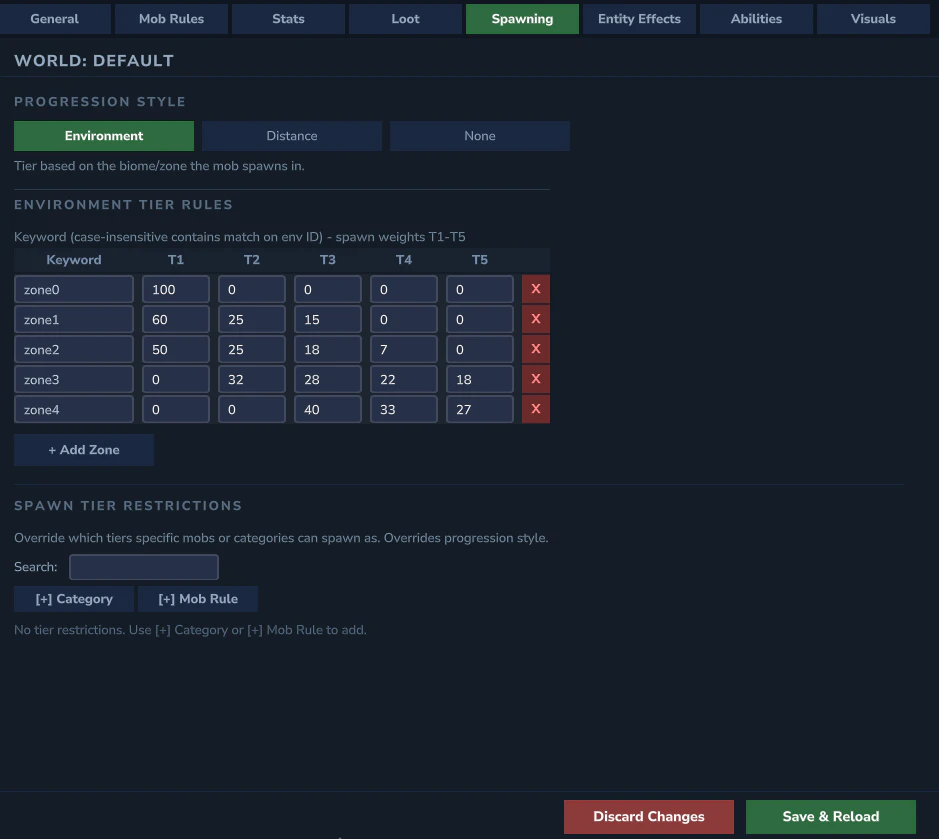
Progression Style
Cycle button to select the progression style:- ENVIRONMENT - tiers tied to Hytale zone difficulty
- DISTANCE_FROM_SPAWN - tiers scale with distance from world origin
- NONE - random tier assignment
Spawn Chances
5 weight fields (T1–T5) controlling the probability of each tier. Higher values mean that tier appears more often. Set a tier to0 to prevent it from spawning.
Environment Tier Rules
When usingENVIRONMENT progression, a list of zone rules appears. Each zone entry has:
- Zone name (e.g., Env_Zone1, Env_Zone2)
- Enabled toggle - set to OFF to prevent elites in that zone
- Per-tier spawn weights - 5 fields controlling tier distribution for that zone
Distance Bonuses
When usingDISTANCE_FROM_SPAWN progression:
- Distance per Tier - blocks of distance before the next tier unlocks
- Bonus Interval - block interval for applying stat bonuses
- Health / Damage Bonus per Interval - bonus added each interval
- Health / Damage Bonus Cap - maximum bonus from distance
Tier Restrictions
Per-mob tier restrictions let you control which tiers specific mobs can spawn as. Each entry has:- Key - a mob rule key (e.g.,
Goblin_Duke) or category key (e.g.,category:Goblins) - 5 tier toggles (T1–T5) - which tiers are allowed for this mob (ON = can spawn as that tier)
- Expandable spawn chance weights - click to expand and set per-tier spawn weights for finer control
Loot Overrides
Per-mob loot template assignments let you force a specific loot template for a mob rule. Each entry maps a mob rule key to a loot template name. Click + Add to add a new loot override entry. YAML reference: See Spawning for the underlyingspawning.yml fields, and Overlays for tierOverrides and lootOverrides overlay fields.