

File Structure
base/ directory holds the 9 base config files that define the defaults for all worlds. The root core.yml holds global settings like enabledByDefault and debug flags.
Per-world overlays live in worlds/ and are matched by exact world name. Per-instance-template overlays live in instances/ and are matched by the template portion of the instance world name.
How Resolution Works
When a world loads, RPGMobs resolves its configuration through the following steps:- Exact world match - the world name is checked against files in
worlds/. If a file named{WorldName}.ymlexists, that overlay is applied on top of the base config. - Instance template match - instance worlds are named
instance-{Template}-{UUID}. The{Template}portion is matched case-insensitively against files ininstances/. For example,instance-Dungeon_Goblin-a1b2c3d4-...matchesinstances/Dungeon_Goblin.yml. - No match, enabled by default - if no overlay file matches and
enabledByDefault: trueis set in the rootcore.yml, the world uses the base config as-is. - No match, disabled by default - if no overlay file matches and
enabledByDefault: false, RPGMobs is disabled for that world entirely.
null or omitted in an overlay inherits from the base config.
Creating an Overlay
Overlays can be created in two ways:- Admin UI (recommended) - run
/rpgmobs configin-game. The sidebar lists all worlds and instance templates. Select one and edit its settings visually. Changes are saved to the appropriate overlay file automatically. - Manual YAML - create a
.ymlfile inworlds/orinstances/with the world name or template name as the filename. Only include fields you want to override.
Overlayable Fields Reference
Every field below can be set in an overlay file. Omitted fields inherit from the base config.General
Spawning
Distance From Spawn
These fields only apply whenprogressionStyle is "DISTANCE_FROM_SPAWN".
Stats
Abilities
Example YAML structure for ability overlays:
Loot
Elite Behavior
Visuals
XP Integration
These fields require the RPGLeveling mod to be installed and enabled.Overrides
Per-World Data
Merge Semantics
Not all fields merge the same way when an overlay is applied on top of the base config:- Most fields - the overlay value is used if non-null, otherwise the base value is inherited. This applies to all scalar fields and most arrays.
environmentTierRules- when an overlay defines any environment tier rules, it fully replaces the base rules. This is not additive. If you define one environment rule in an overlay, all base environment rules are removed for that world.tierPrefixesByFamily- when an overlay defines any family prefixes, it fully replaces the base family prefixes.tierOverrides- additive merge. Overlay entries are added to or replace matching entries in the base map.lootOverrides- additive merge. Overlay entries are added to or replace matching entries in the base map.abilityOverlays- additive merge. Overlay entries are added to or replace matching entries in the base map.
Presets
The Admin UI provides two built-in presets that can be applied to any overlay:
You can also save a Custom preset per overlay. This stores a snapshot of all current overlay settings that can be restored later.
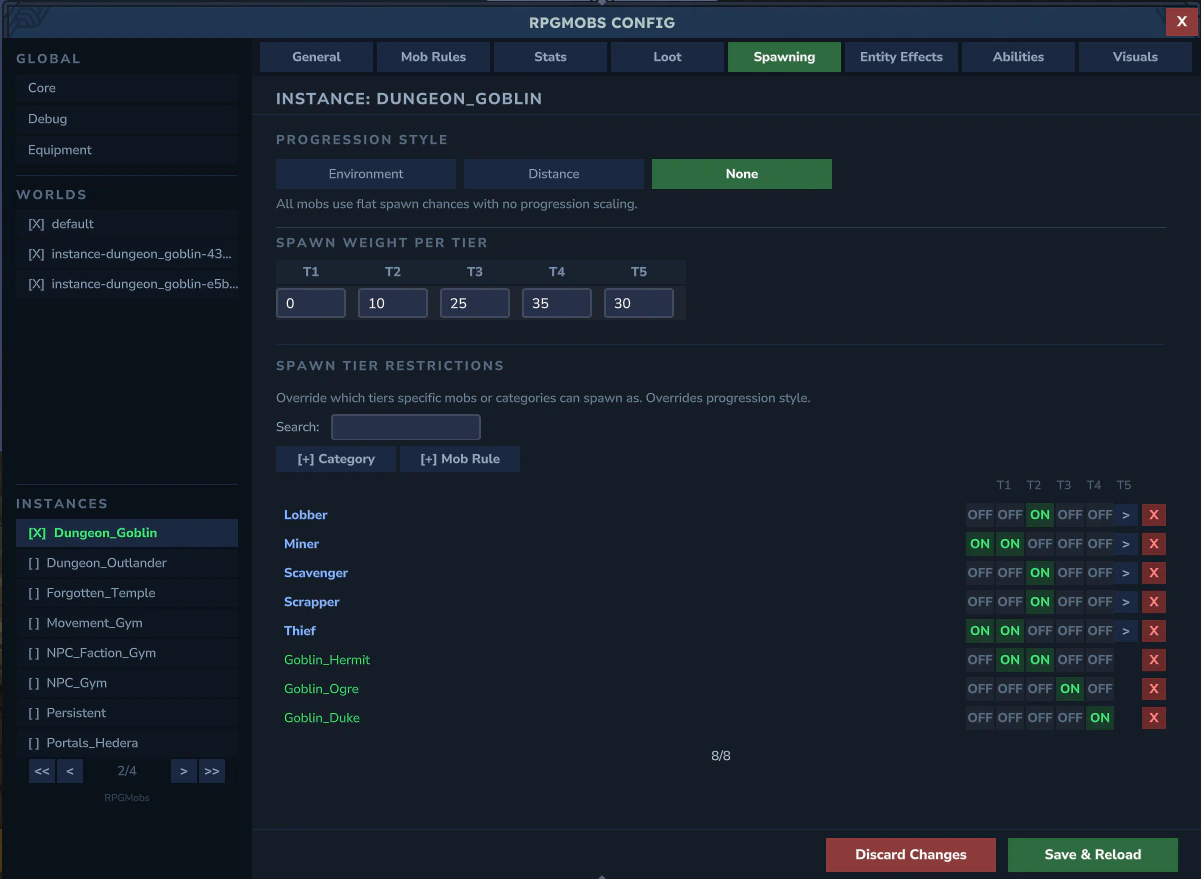
Example: Dungeon_Goblin Instance
RPGMobs ships with a pre-configured example overlay for theDungeon_Goblin instance template. This demonstrates how to tailor RPGMobs for a specific dungeon experience.
instances/Dungeon_Goblin.yml configures:
- Progression set to NONE - tiers are assigned randomly using the defined weights, since dungeons don’t use zone-based or distance-based progression
- No Tier 1 spawns - the first weight is
0, so all dungeon elites are at least Tier 2 - Higher scaling - health and damage multipliers are increased compared to the base config, making dungeon encounters harder
- Elite behavior - friendly fire and fall damage are disabled so elites don’t accidentally kill each other in tight dungeon corridors
- Visuals active - nameplates and model scaling remain enabled so players can identify threat levels
Tips
Tip: To disable RPGMobs in a specific world (e.g., a lobby), create an overlay withenabled: false. No other fields are needed.
Tip: To use the base config unchanged in a world, simply don’t create an overlay file for it. As long as enabledByDefault: true is set in the root core.yml, unmatched worlds use the base config automatically.
Tip: Use the Admin UI (/rpgmobs config) for the easiest editing experience. It handles file creation, field validation, and dirty-change tracking automatically.