The Combat AI tab provides editors for the CombatActionEvaluator (CAE) system that drives elite melee and ranged combat behavior. It is divided into 3 sub-tabs: Combat Styles, Tier Behavior, and Weapon Combat. Combat AI - Combat Styles

Combat Styles

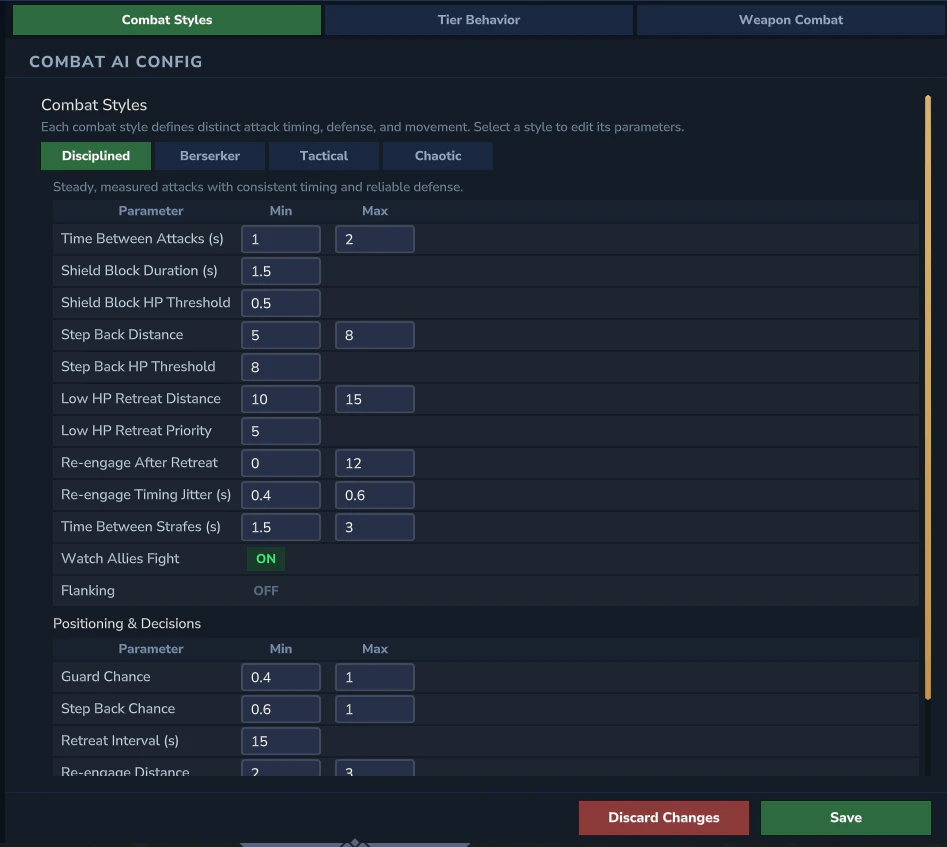
Each combat style defines a distinct combat personality that controls attack timing, defensive behavior, and movement patterns. RPGMobs ships with 4 built-in styles. Any style can be assigned to any mob rule via the Combat Style selector.

Disciplined

Steady, measured attacks with consistent timing and reliable defense.
  • Attack Cooldown: 1.0 - 2.0s
  • Shield and guard usage at T2+
  • Step back after attacks at T2+
  • Health retreat at T3+

Berserker

Aggressive, fast-paced pressure with relentless attacks and little retreat.
  • Attack Cooldown: 0.4 - 0.8s
  • Minimal guard usage
  • Step back at T2+ (brief)
  • Health retreat at T3+ (low threshold)

Tactical

Calculated approach with strafing, early retreats, and flanking at high tiers.
  • Attack Cooldown: 0.8 - 1.2s
  • Shield and guard usage at T2+
  • Step back after attacks at T2+
  • Health retreat at T3+
  • Flanking at T5

Chaotic

Unpredictable timing with random bursts of aggression and erratic movement.
  • Attack Cooldown: 0.3 - 2.0s
  • Occasional guard usage
  • BackOff at T2+
  • Health retreat at T3+

Combat Style Parameters

Each style exposes the following parameters:
ParameterDescription
attackCooldownMin / attackCooldownMaxRange for the random delay between basic attacks.
shieldBlockEnabledWhether the style uses sustained shield guard (CAE ShieldBlock action).
backoffEnabledWhether the style retreats briefly after completing an attack chain.
retreatEnabledWhether the style retreats when health drops below a threshold.
reengageEnabledWhether the style automatically re-engages after retreating.
strafeEnabledWhether the style strafes around the target between attacks.
observeEnabledWhether grouped elites pause to observe before joining combat (CAE GroupObserve).
flankingEnabledWhether the style attempts to position behind the target (T5 only for most styles).

Tier Behavior

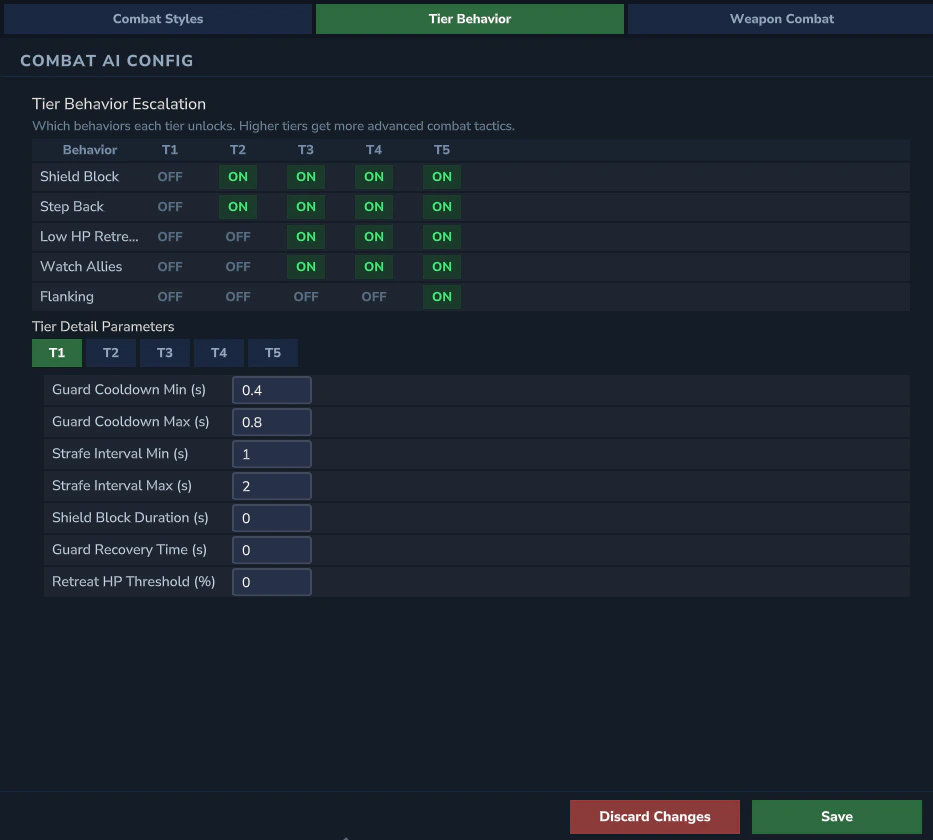
Combat AI - Tier Behavior Per-tier behavior escalation controls which CAE actions are available at each tier. Higher tiers unlock more sophisticated combat behaviors.

Toggle Grid

A 5-column (T1 - T5) by 5-row grid of ON/OFF toggles:
BehaviorT1T2T3T4T5
Shield BlockOFFONONONON
BackOffOFFONONONON
Health RetreatOFFOFFONONON
Group ObserveOFFOFFONONON
FlankingOFFOFFOFFOFFON
These are the default values. Each cell can be toggled independently per world overlay.

Tier Detail Parameters

Clicking a tier row expands a detail panel with tunable parameters:
ParameterDescriptionExample (T3)
guardChargeForHow long the mob holds its shield guard before releasing.3.5s
guardCooldownMinimum time between guard actions.6.0s
retreatHealthThresholdHealth percentage below which the mob retreats.0.35
retreatDurationHow long the mob retreats before re-engaging.3.0s
movementSpeedMultiplierMovement speed modifier during combat.1.0
backoffDistanceHow far the mob backs away after an attack chain.3.0

Weapon Combat

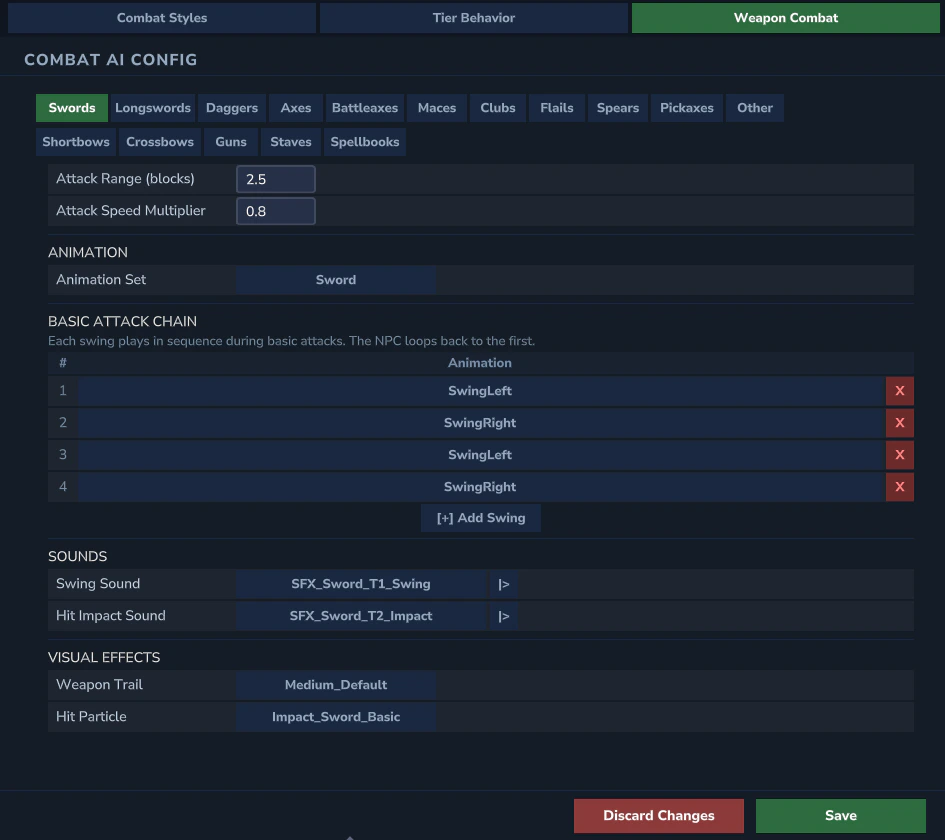
Combat AI - Weapon Combat The Weapon Combat sub-tab provides per-weapon attack chain editing. Each of the 9 weapon types (Swords, Longswords, Daggers, Axes, Battleaxes, Maces, Clubs, ClubsFlail, Spears) has its own configuration section.

Weapon Selector

A row of 9 clickable buttons selects the active weapon type. The editor below updates to show that weapon’s configuration.

Attack Chain Editor

The attack chain defines the sequence of swing animations the NPC cycles through during basic attacks.
  • Animation Set - the Hytale animation set used for this weapon (e.g., Sword, Daggers, Battleaxe)
  • Swing Chain - ordered list of animation IDs (e.g., SwingLeft, SwingRight, SwingDown). Each entry can be reordered, added, or removed.
  • Chain Preview - text summary showing the full chain sequence
Default chains use left-right alternating patterns for most weapons. Axes and Battleaxes include directional variety (SwingDownLeft, SwingDownRight).

Sound Configuration

Each weapon has two sound slots:
SlotDescriptionExample
Swing SoundPlayed on every swing.SFX_Sword_T1_Swing
Impact SoundPlayed on successful hit only (in the damage template, not the swing).SFX_Sword_T2_Impact
The per-weapon sound mapping:
WeaponSwing SoundImpact Sound
SwordsSFX_Sword_T1_SwingSFX_Sword_T2_Impact
LongswordsSFX_Sword_T1_SwingSFX_Sword_T2_Impact
DaggersSFX_Daggers_T1_SwingSFX_Daggers_T2_Slash_Impact
AxesSFX_Battleaxe_T1_SwingSFX_Battleaxe_T1_Impact
BattleaxesSFX_Battleaxe_T1_SwingSFX_Battleaxe_T2_Impact
MacesSFX_Mace_T1_SwingSFX_Mace_T2_Impact
ClubsSFX_Mace_T1_SwingSFX_T1_Impact_Blunt
ClubsFlailSFX_Mace_T1_SwingSFX_T1_Impact_Blunt
SpearsSFX_Spear_LungeSFX_Spear_Impact

Trail & Particle Selection

Each weapon can have an optional weapon-attached trail during swings and a hit particle on impact. These are selected from the available Hytale asset IDs.

Additional Weapon Parameters

ParameterDescription
maxRangeMaximum attack reach for this weapon type. Larger weapons have longer range.
speedMultiplierAttack speed modifier. Daggers are fastest, Battleaxes slowest.
YAML reference: See Combat for the underlying combat.yml fields.