> ## Documentation Index
> Fetch the complete documentation index at: https://docs.rpgmobs.frotty27.com/llms.txt
> Use this file to discover all available pages before exploring further.
# Mob Rules Tab
> Managing mob rules through the Admin UI - global editing and per-world enable/disable.
The Mob Rules tab works differently depending on whether you are editing at the **global** level or a **per-world overlay** level.
* **Global (Global Config sidebar):** Full tree editor with categories, detail panels, weapon/armor categories, and combat style selection.
* **Per-world (World/Instance sidebar):** Simplified view with ON/OFF toggles only. No detail editing - just enable or disable individual rules or entire categories.
## Global Mob Rules Editor
When editing mob rules from the Global Config sidebar section, you have full access to the tree explorer and detail panels.
 ### Tree Explorer
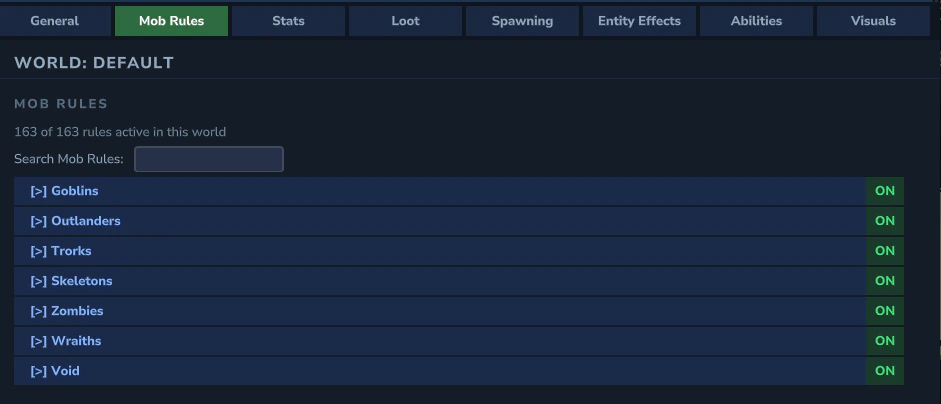
* **Categories** shown in blue - click to navigate into. Prefixed with `[>]`
* **Items** shown in green - click to expand the detail panel below
* **Search filter** - type to search all mob rules across all categories (flattens the tree)
* **Back/Forward** navigation history for browsing categories
* **Breadcrumb** bar showing current location in the tree
### Mob Rule Detail Panel
Clicking a mob rule item expands a detail panel below it:
### Tree Explorer
* **Categories** shown in blue - click to navigate into. Prefixed with `[>]`
* **Items** shown in green - click to expand the detail panel below
* **Search filter** - type to search all mob rules across all categories (flattens the tree)
* **Back/Forward** navigation history for browsing categories
* **Breadcrumb** bar showing current location in the tree
### Mob Rule Detail Panel
Clicking a mob rule item expands a detail panel below it:
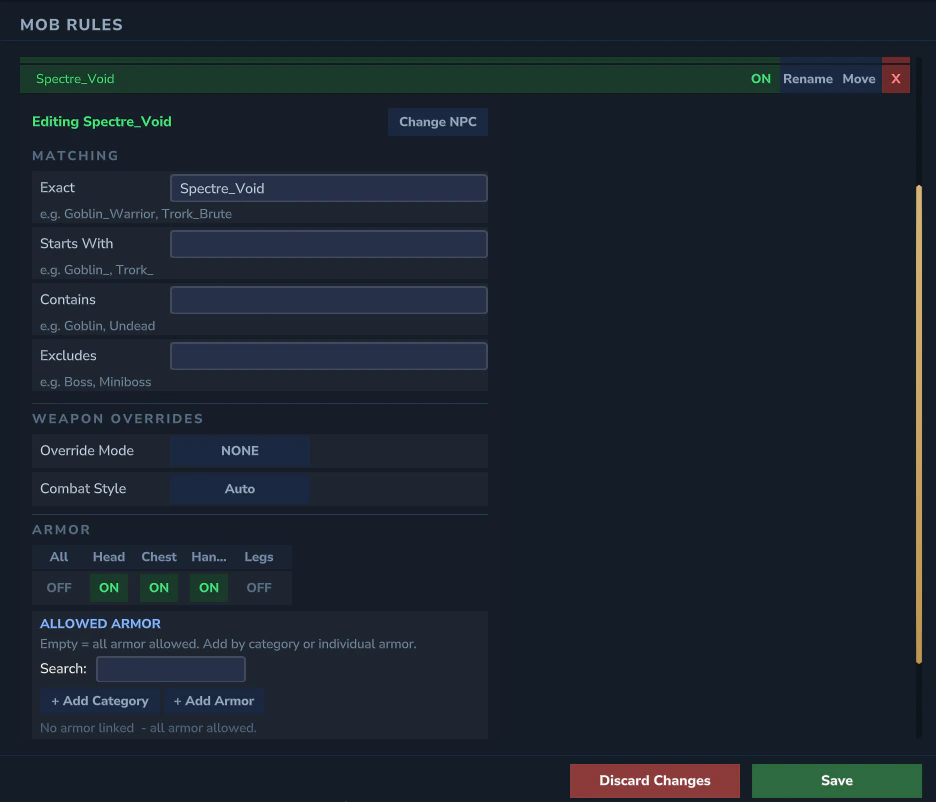 * **Enabled** toggle
* **Match patterns** - exact, prefix, contains, and excludes lists
* **Weapon Override Mode** - cycle between ALWAYS, ONLY\_IF\_EMPTY, NONE
* **Per-tier weapon override** toggles (T1 - T5)
* **Weapon category** links - click `[>]` to peek at category contents
* **Armor category** links
* **Armor slot restrictions** - control which armor slots the mob can equip
* **Combat style selector** - assign a combat style (Disciplined, Berserker, Tactical, Chaotic) to this mob rule. This determines the CAE behavior profile used for basic attacks, guard timing, and movement patterns. See [Combat AI](/ui/combat-ai) for details on each style.
* **Change NPC** button - opens the NPC picker to rebind the rule to a different NPC
### Adding Mob Rules
Click **\[+ Add Mob Rule]** to open the NPC picker. NPCs that already have mob rules are automatically excluded from the list. You can also enter a custom ID for non-standard NPCs.
### Adding Categories
Click **\[+ Add Category]** to create a new sub-category within the current category. Categories help organize mob rules into logical groups (e.g., Goblins, Skeletons, Undead).
### Rename & Move
Each tree row has **Rename** and **Move** buttons:
* **Rename** opens a text popup to change the item or category name
* **Move** opens a category browser to relocate the item to a different category
## Per-World Mob Rules
When viewing mob rules from a **World** or **Instance** sidebar entry, the tab shows a simplified view focused on enabling or disabling rules for that specific world.
### ON/OFF Toggle View
Each mob rule appears as a row with an ON/OFF toggle. No detail panel is shown - per-world overlays only control whether a rule is active in that world, not its configuration.
* **Individual toggles** - enable or disable specific mob rules
* **Category bulk toggle** - toggling a category ON/OFF applies to all rules within it
* **Summary counter** - shows how many rules are enabled vs. total (e.g., "142 / 200 enabled")
### Global OFF Indicator
If a mob rule is disabled at the global level, the per-world row shows a "Global OFF" indicator. Per-world toggles cannot override a globally disabled rule - the rule must be re-enabled globally first.
### Search Filter
The same search filter is available in per-world view. Type to search across all categories. Filter results show flat rows with ON/OFF toggles.
**YAML reference:** See [Mobs](/config/mobs) for the underlying `mobrules.yml` fields.
* **Enabled** toggle
* **Match patterns** - exact, prefix, contains, and excludes lists
* **Weapon Override Mode** - cycle between ALWAYS, ONLY\_IF\_EMPTY, NONE
* **Per-tier weapon override** toggles (T1 - T5)
* **Weapon category** links - click `[>]` to peek at category contents
* **Armor category** links
* **Armor slot restrictions** - control which armor slots the mob can equip
* **Combat style selector** - assign a combat style (Disciplined, Berserker, Tactical, Chaotic) to this mob rule. This determines the CAE behavior profile used for basic attacks, guard timing, and movement patterns. See [Combat AI](/ui/combat-ai) for details on each style.
* **Change NPC** button - opens the NPC picker to rebind the rule to a different NPC
### Adding Mob Rules
Click **\[+ Add Mob Rule]** to open the NPC picker. NPCs that already have mob rules are automatically excluded from the list. You can also enter a custom ID for non-standard NPCs.
### Adding Categories
Click **\[+ Add Category]** to create a new sub-category within the current category. Categories help organize mob rules into logical groups (e.g., Goblins, Skeletons, Undead).
### Rename & Move
Each tree row has **Rename** and **Move** buttons:
* **Rename** opens a text popup to change the item or category name
* **Move** opens a category browser to relocate the item to a different category
## Per-World Mob Rules
When viewing mob rules from a **World** or **Instance** sidebar entry, the tab shows a simplified view focused on enabling or disabling rules for that specific world.
### ON/OFF Toggle View
Each mob rule appears as a row with an ON/OFF toggle. No detail panel is shown - per-world overlays only control whether a rule is active in that world, not its configuration.
* **Individual toggles** - enable or disable specific mob rules
* **Category bulk toggle** - toggling a category ON/OFF applies to all rules within it
* **Summary counter** - shows how many rules are enabled vs. total (e.g., "142 / 200 enabled")
### Global OFF Indicator
If a mob rule is disabled at the global level, the per-world row shows a "Global OFF" indicator. Per-world toggles cannot override a globally disabled rule - the rule must be re-enabled globally first.
### Search Filter
The same search filter is available in per-world view. Type to search across all categories. Filter results show flat rows with ON/OFF toggles.
**YAML reference:** See [Mobs](/config/mobs) for the underlying `mobrules.yml` fields.