> ## Documentation Index
> Fetch the complete documentation index at: https://docs.rpgmobs.frotty27.com/llms.txt
> Use this file to discover all available pages before exploring further.
# Equipment
> Managing weapon categories, armor categories, and rarity rules through the Admin UI.
When selecting **Global Config** in the sidebar, 3 sub-tabs appear for managing equipment configuration that applies to all worlds.
## Weapon Categories
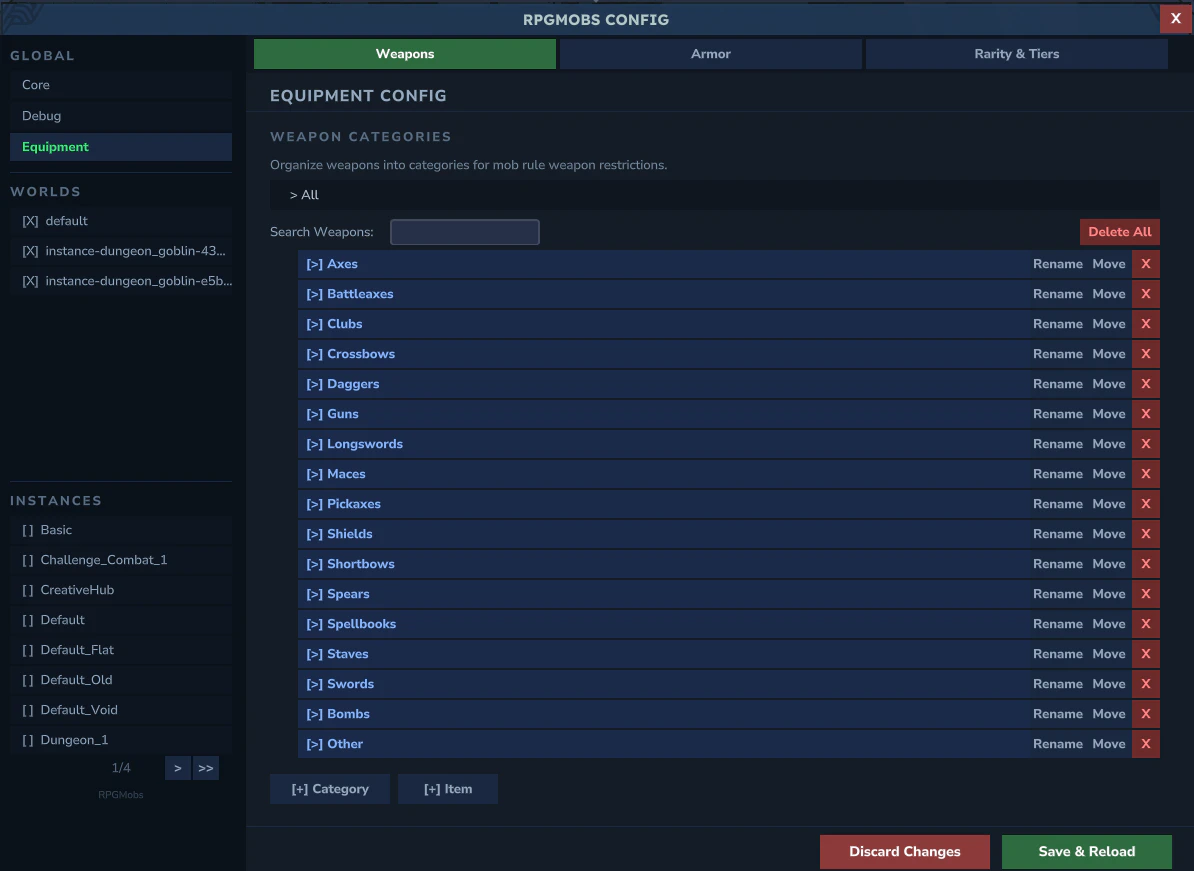 Manage the weapon category tree. Categories are named groups of weapon IDs (e.g., "Swords" contains all sword weapon IDs). Mob rules reference these categories using `category:CategoryName` syntax.
* **Tree explorer** with expandable detail panels showing category contents
* **Add/Rename/Delete** individual weapon IDs within each category
* **Add Category** to create new groupings
## Armor Categories
Manage the weapon category tree. Categories are named groups of weapon IDs (e.g., "Swords" contains all sword weapon IDs). Mob rules reference these categories using `category:CategoryName` syntax.
* **Tree explorer** with expandable detail panels showing category contents
* **Add/Rename/Delete** individual weapon IDs within each category
* **Add Category** to create new groupings
## Armor Categories
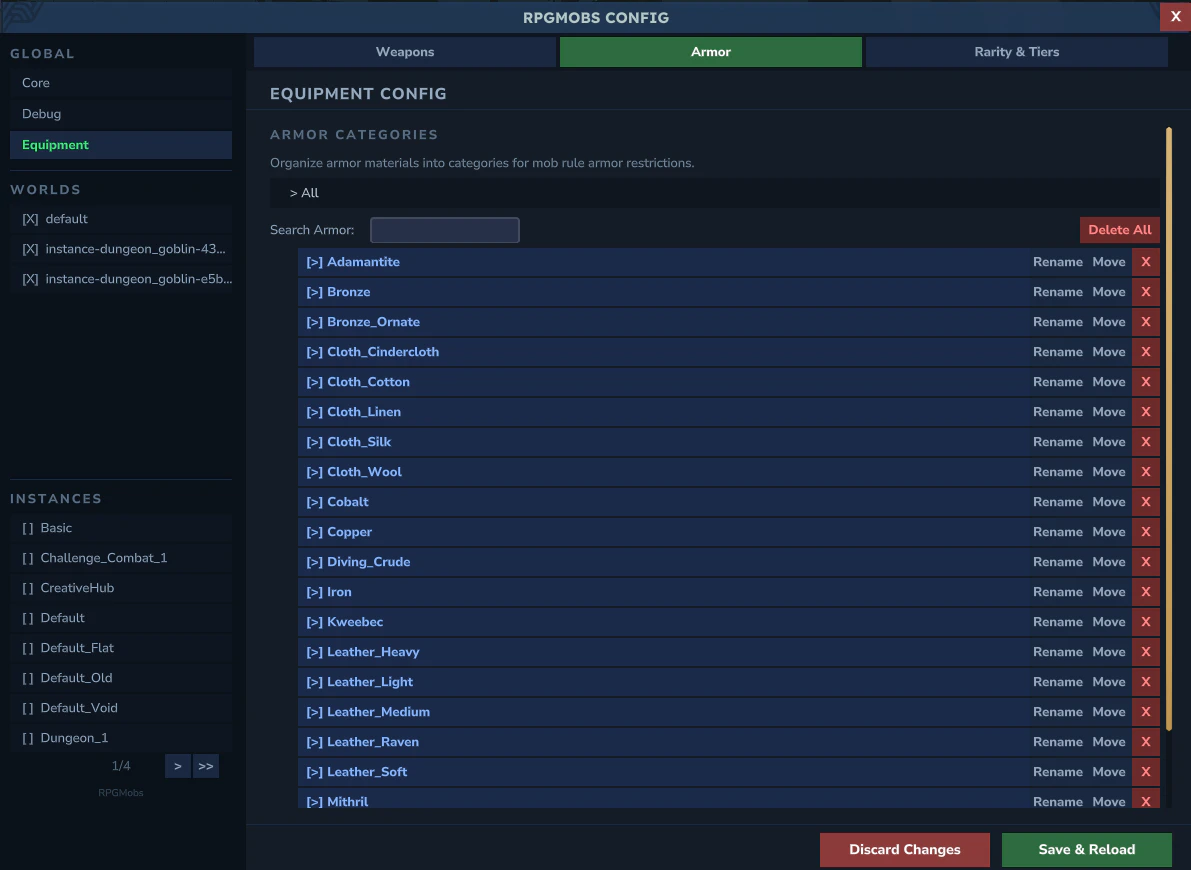 Same pattern as weapon categories, but for armor. Armor IDs use the `Armor_Material_Slot` format (e.g., `Armor_Iron_Head`, `Armor_Iron_Chest`).
## Rarity & Tiers
Same pattern as weapon categories, but for armor. Armor IDs use the `Armor_Material_Slot` format (e.g., `Armor_Iron_Head`, `Armor_Iron_Chest`).
## Rarity & Tiers
 ### Gear Durability
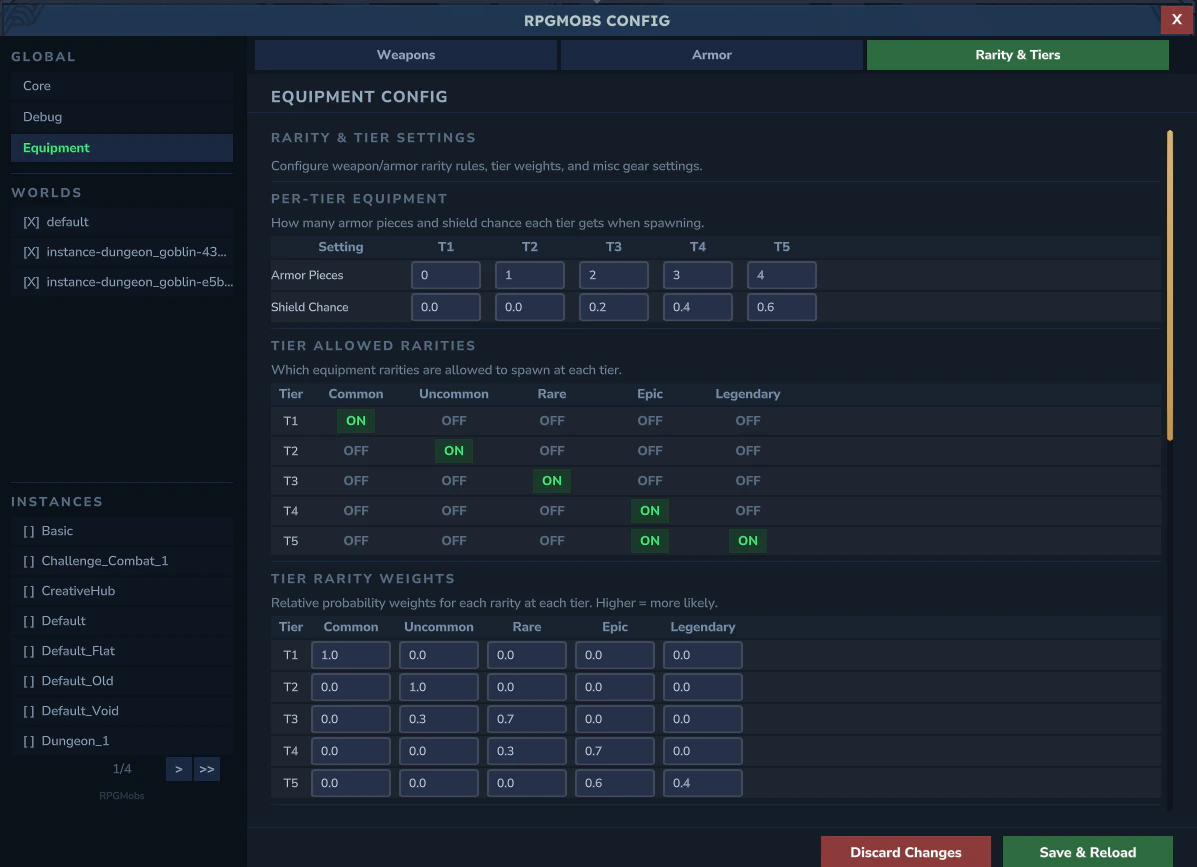
* **Spawn Durability Min/Max** - condition range for gear spawned on elites
### Per-Tier Equipment
* **Armor Pieces per Tier** - 5 fields (T1–T5) controlling how many armor slots each tier fills
* **Shield Chance per Tier** - 5 fields (T1–T5) controlling off-hand utility item probability
### Tier Allowed Rarities
A 5x5 ON/OFF toggle grid - 5 tiers (rows) by 5 rarities (common, uncommon, rare, epic, legendary). Controls which rarity levels each tier can equip.
### Tier Rarity Weights
5 clickable tier rows with summary text. Expanding a row shows 5 weight fields - one per rarity - controlling how likely each rarity is to be chosen for that tier.
### Two-Handed Keywords
Paginated list of keywords that mark weapons as two-handed. Mobs holding a two-handed weapon never equip a shield.
### Weapon / Armor Rarity Rules
Paginated map editors - each entry is a keyword fragment paired with a rarity (cycles through common/uncommon/rare/epic/legendary). When an item ID contains the keyword, it is classified as that rarity.
**YAML reference:** See [Gear](/config/gear) for the underlying `gear.yml` fields.
### Gear Durability
* **Spawn Durability Min/Max** - condition range for gear spawned on elites
### Per-Tier Equipment
* **Armor Pieces per Tier** - 5 fields (T1–T5) controlling how many armor slots each tier fills
* **Shield Chance per Tier** - 5 fields (T1–T5) controlling off-hand utility item probability
### Tier Allowed Rarities
A 5x5 ON/OFF toggle grid - 5 tiers (rows) by 5 rarities (common, uncommon, rare, epic, legendary). Controls which rarity levels each tier can equip.
### Tier Rarity Weights
5 clickable tier rows with summary text. Expanding a row shows 5 weight fields - one per rarity - controlling how likely each rarity is to be chosen for that tier.
### Two-Handed Keywords
Paginated list of keywords that mark weapons as two-handed. Mobs holding a two-handed weapon never equip a shield.
### Weapon / Armor Rarity Rules
Paginated map editors - each entry is a keyword fragment paired with a rarity (cycles through common/uncommon/rare/epic/legendary). When an item ID contains the keyword, it is classified as that rarity.
**YAML reference:** See [Gear](/config/gear) for the underlying `gear.yml` fields.